
Waygraph Studio
The project in the browser, drawn by hand: its pages and the Blocks between them, its flows step by step with what each step expects, its runs, and a button to play any flow.
WARNING
Beta. What its pages show and where things sit can change from one version to the next. It only reads your project and plays its flows; it never changes your files.
npx waygraph studio            # in the project, or any folder inside it
npx waygraph studio ../shop    # another project
It comes with waygraph (0.16.13 and later) and needs Node 24 or newer, like the rest of waygraph: nothing else to install. In a project, npx waygraph studio runs the project's own waygraph; on an older one, update it first (npm install waygraph@latest). It prints the address (http://localhost:9294, or the next free port; --port N picks one). Ctrl-C stops it, and a flow it's still playing, with its browser.
The project is the folder you name, or the one the current folder is in: the nearest folder, here or above, with a waygraph.config.* (in it or in config/) or a package.json that depends on waygraph.
How it works
- It reads; it never writes. The map and the flows come from
waygraph manifest, read through the project's own install, and the runs from.waygraph/runs/. Nothing it shows is stored anywhere else. - It plays with your waygraph. Run and Demo start the project's own
waygraph run/waygraph demo, the same as you would from a terminal, so a run from the UI writes the same run log as any other. - It stays quick. A manifest older than 30 seconds is still shown at once while a new one is read (the refresh button in the sidebar waits for the new one), and a page loads when you point at its link.
The map
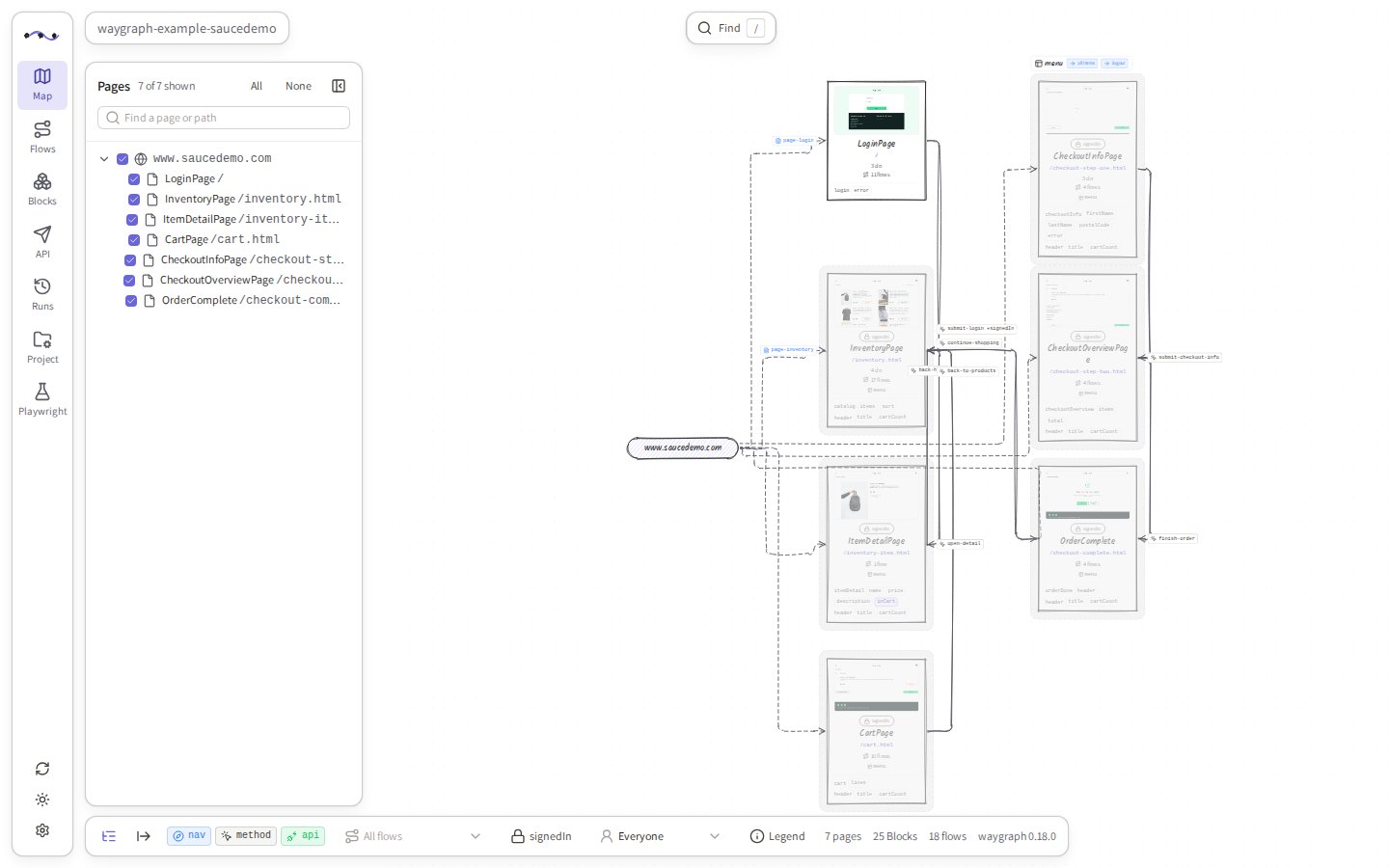
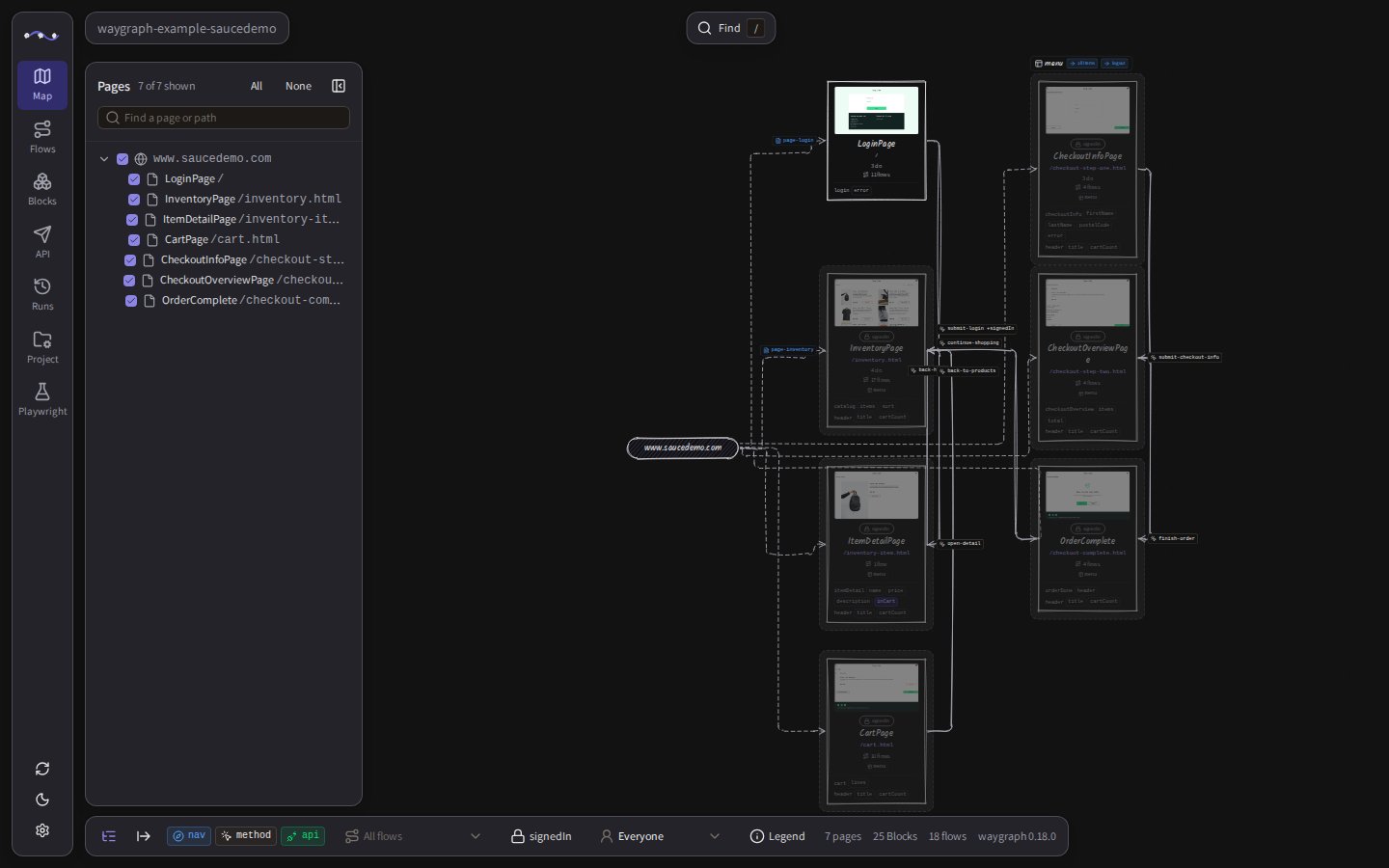
The project as a site map: each site at the top (the base url's host, and every other site a page's address names: a payment provider, a mail catcher), its pages below by their addresses, one level per part of the address. A part no page has is a folder (auth/, platform/, then plant/, so /platform/plant/lines sits three levels in).
- Dashed lines hang each page from its site, labelled with what opens it by address (a Page Block's
url, or a Nav). - Arrows are the moves between pages, labelled with the Blocks that make them: a badge per Block, with its whole name, in its kind's colour and with its icon (Nav blue, Method grey, API green). Labels meeting at one page stack, and the map makes room for them: a label never covers a box.
- A page's box has its newest screenshot (when a Block took one), its address, how much you can do there, how many flows pass through it and how many failed their newest run, and what it shows: the fields its read gives, by namespace, the yes/no ones highlighted as the states the page can be in (
login.linkSent), which flows check withKey.isinstead of a Checkpoint of their own. - A shell (a page that covers pages: a menu, a sidebar) is a dashed halo behind each page it covers, with its tag above the first: its links as chips (click one to go to its page) and its interrupts as badges. Its links aren't drawn from every page, so there is no web of lines; each page it covers carries its name.
A page's address comes from its own url (or its folder, or a Nav) that opens it (a url built from mem shows as a pattern: /requests/:id) and from the Trait.url its Blocks verify on arrival. A page with no address of its own sits under the page whose move reaches it. Pages in a row follow the order your flows visit them.
Find (the button at the top, or /, or Ctrl/Cmd-K) finds a page, a flow or a Block by name: type a few letters, Enter, and the page or Block's panel opens (a flow opens its own page).
The bottom bar holds the key (the Block kinds), Legend (every shape, line and badge, and what's in a page's box), the switch between left to right and top down (remembered), and the counts.
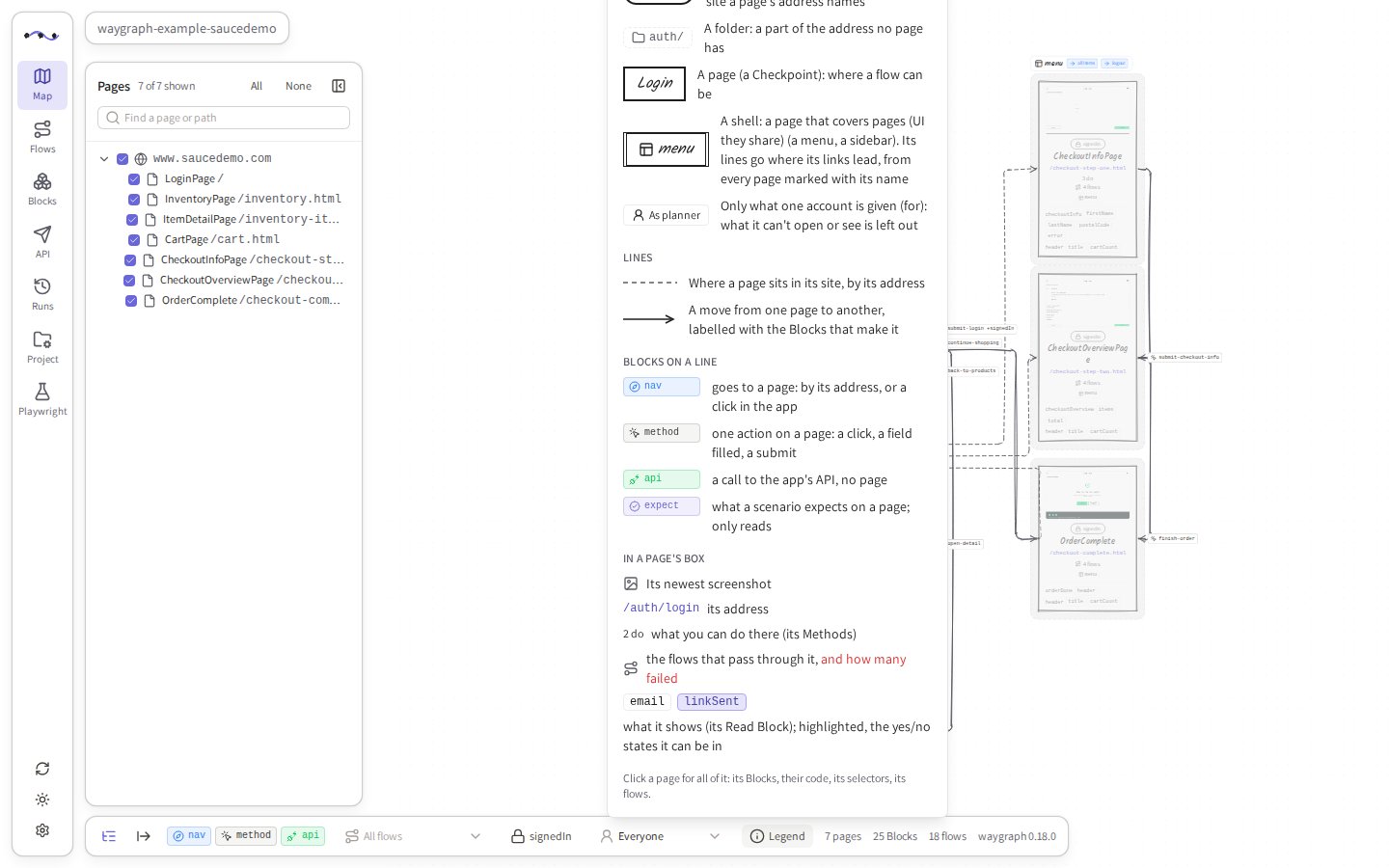
Beside the map, the site map as a folder tree: uncheck a site, a folder or a page to leave it off the map, or keep one branch with only (say, just platform/plant/equipment); your browser remembers the choice for the project. The tree minimizes to a Pages button, with how many pages the map shows.
A page
Click a page for everything about it, most telling first:
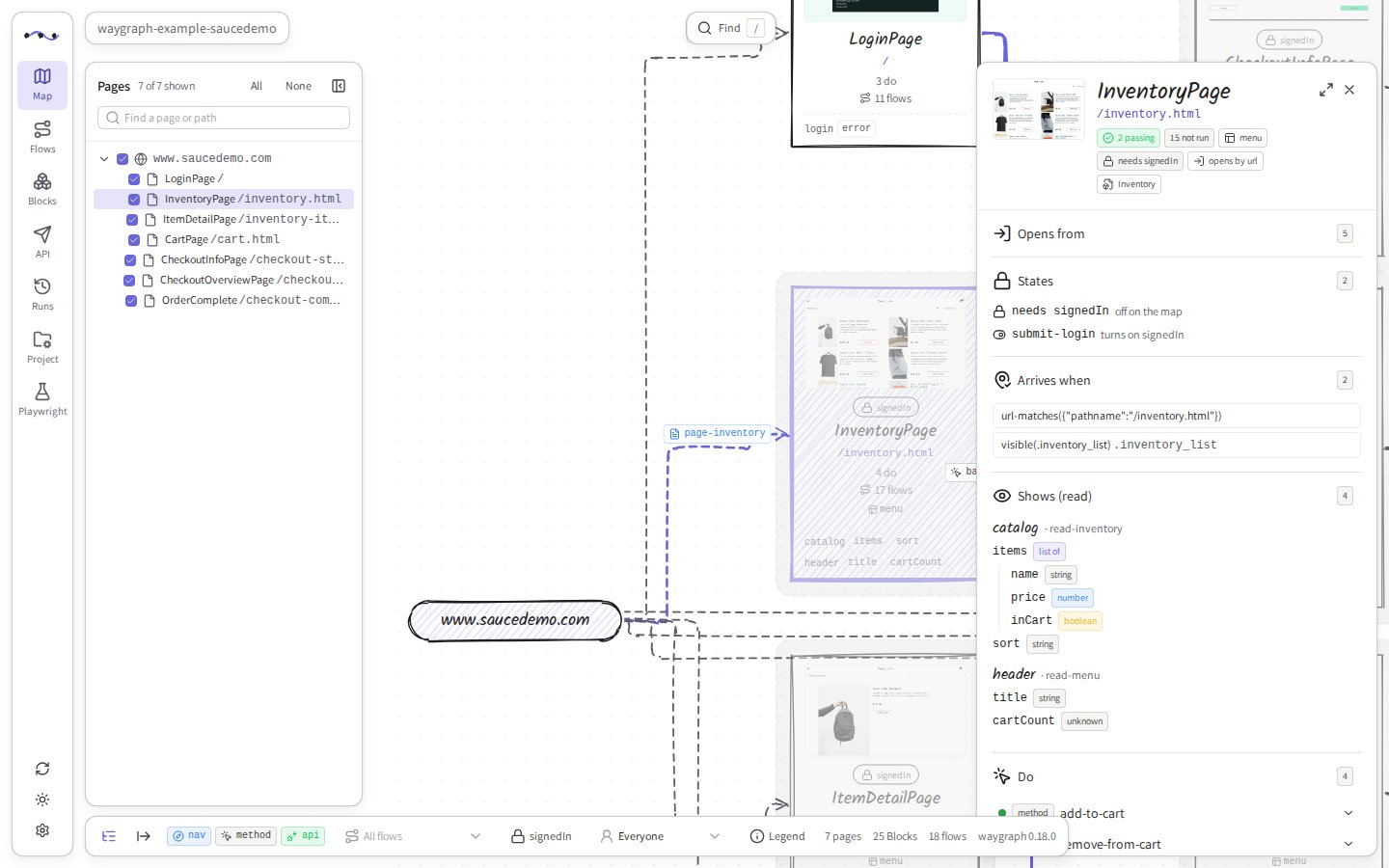
- Its screenshot, addresses, how its flows' newest runs went (failing, passing, not run), its layouts and who can open it (its Page Block's
for). - Each move and expectation has a dot: how it last went in the runs the app has read (green passed, red failed, grey not run). A move with params says so: a flow gives it values, so the auto and Pilot menus don't list it.
- Shows (read): its
readfields, the yes/no states first, and the query params it keeps in its address (?tab). Arrives when: the checks that prove the browser is on this page. - Opens from, Do, Leads to: its Blocks (a Method written in the page shows by its key). Open one for its checks, the selectors it reads and its code; the arrows in the panel's corner widen it to read code.
- Expected here: its Expect Blocks, and what Blocks promise on arrival.
- Selectors its Blocks read, then Network: the calls the flows' newest runs made on arrival (per route: how many, how long, the status), with findings on them (the same GET twice, one route asked with many ids, slow, large, failed; the same as
waygraph check --network), and Flows last: each one that lands there, may land there (a step with several outcomes that ends the flow) or does something there, failing first.
Lines
A line between two pages is routed around every other page: it leaves the side of its source that faces the target, runs along the gap between the columns, and comes in beside the target, so a move back to an earlier page no longer cuts through a box. Lines that share a gap or a row are spread apart, so two moves never draw as one. Click a line and its panel lists the move: the Blocks that make it (click one for its checks and code), what each does to a state (turns on signedIn), and the states the page it leads to needs.
States
A project that declares states (state() mem keys, States) gets one switch per state in the map's bottom bar. A page that needs a state shows a lock and the state's name, and is dimmed while the state is off: a move that changes a state says so on its line (menu-logout -signedIn); a word state (a role) is a menu instead of a switch; a page's panel has a States section and a badge by its name (needs signedIn), with what each move into or out of it sets; switch signedIn on and the signed-in pages come back. It answers "which pages can this user reach" without reading code.
A live session
With a browser session open on the project (waygraph pilot start, waygraph auto), the map follows it: the page the browser is on says you are here, and moves as the person clicks or a flow step runs. Studio asks the project's own waygraph (browser sessions, pilot status) every few seconds while a session is open, and now and then when none is.
A shell
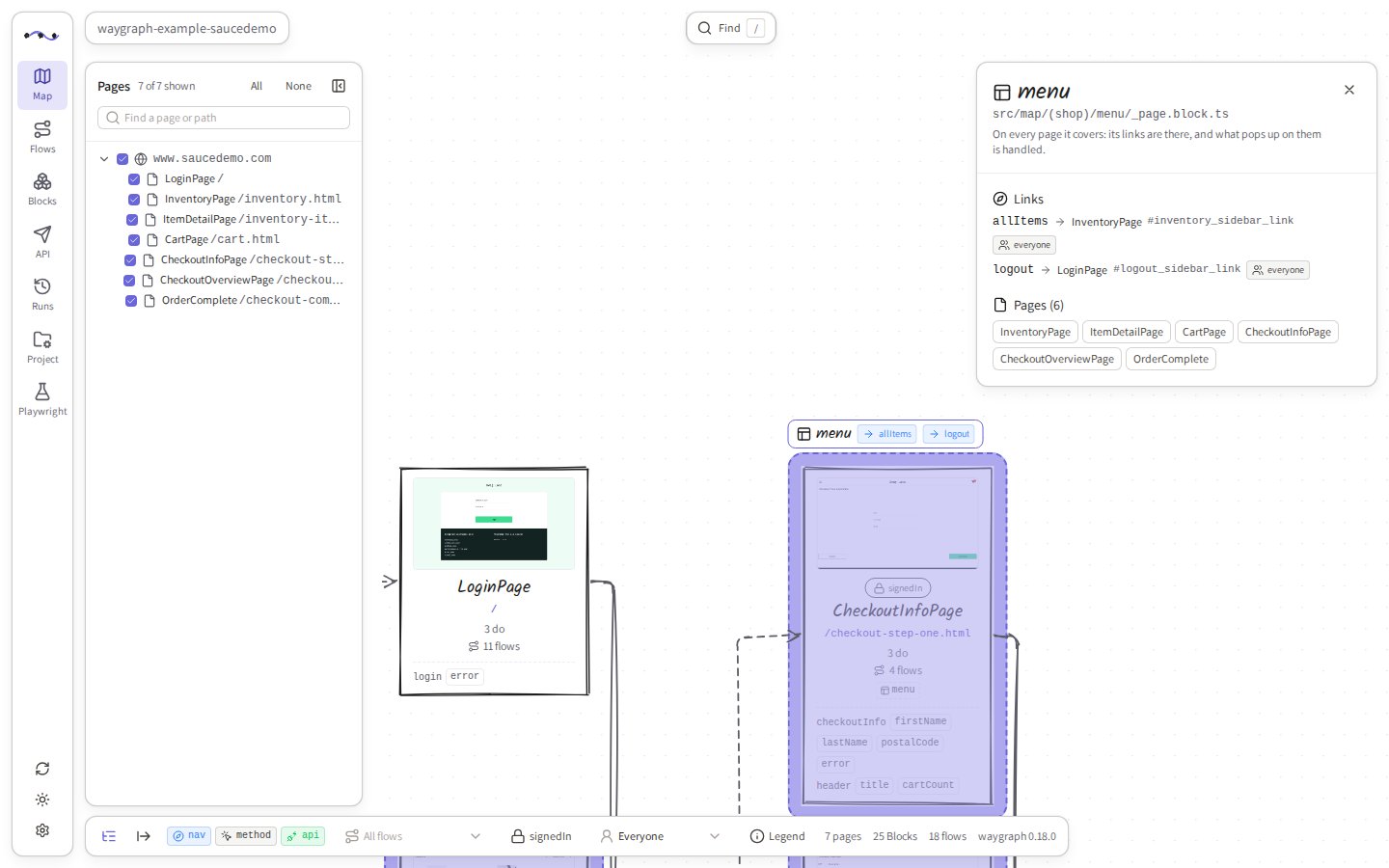
Click a shell's name for its links (where each leads, its selector, who sees it), its actions, what it shows, what it handles when it shows up (its interrupts) and the pages it covers; click a page there to go to it.
As one account
When the project has accounts, the bottom bar shows the map as one of them (As planner): the pages it can't open and the Blocks it isn't given (for) are left out, and it says how many. The address keeps the choice (?as=planner), so a view can be shared.
In the dark
The map, and every page, follow your system's light or dark theme.
Flows
A flow's page has a side panel with two tabs: Meta (title, description, labels, ticket, owner, where its video goes, its settings, panes, the preconditions it is given, the keys it needs, and the labels the config's regression.exclude leaves out of the full run) and Code (the flow's source, with the line of the step you picked in the pipeline marked). A flow that needs values (credentials, a record's name) has a Data it is played with form above the Run button: one JSON box per key, starting from the key's stub, kept in this browser and sent as --data. It is sent in the environment, not on the command line, so a password never shows in the run's command.
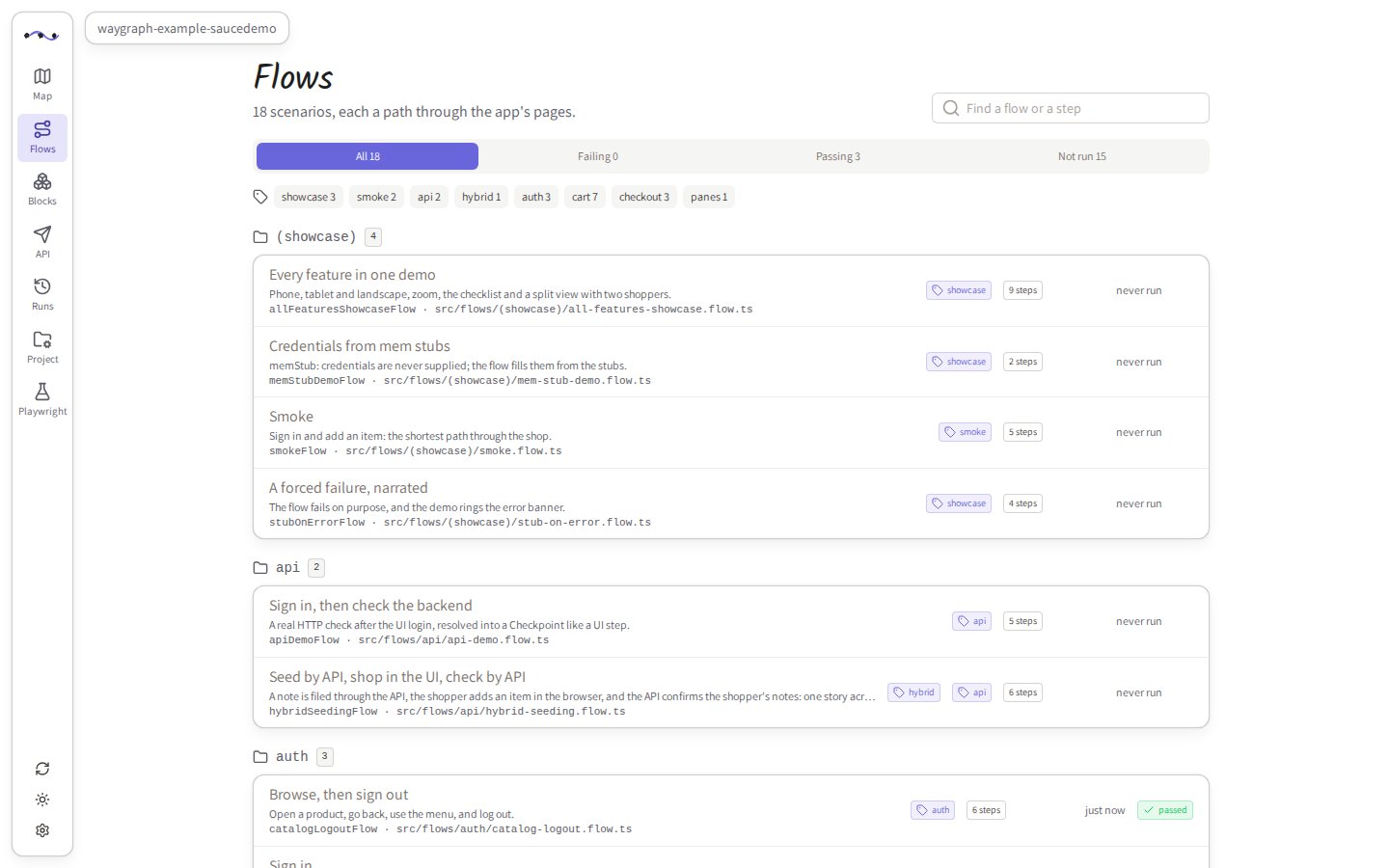
Every flow by its folder, failing first, with its steps, expectations and newest run; filter by failing, passing or not run, or find one by a step.
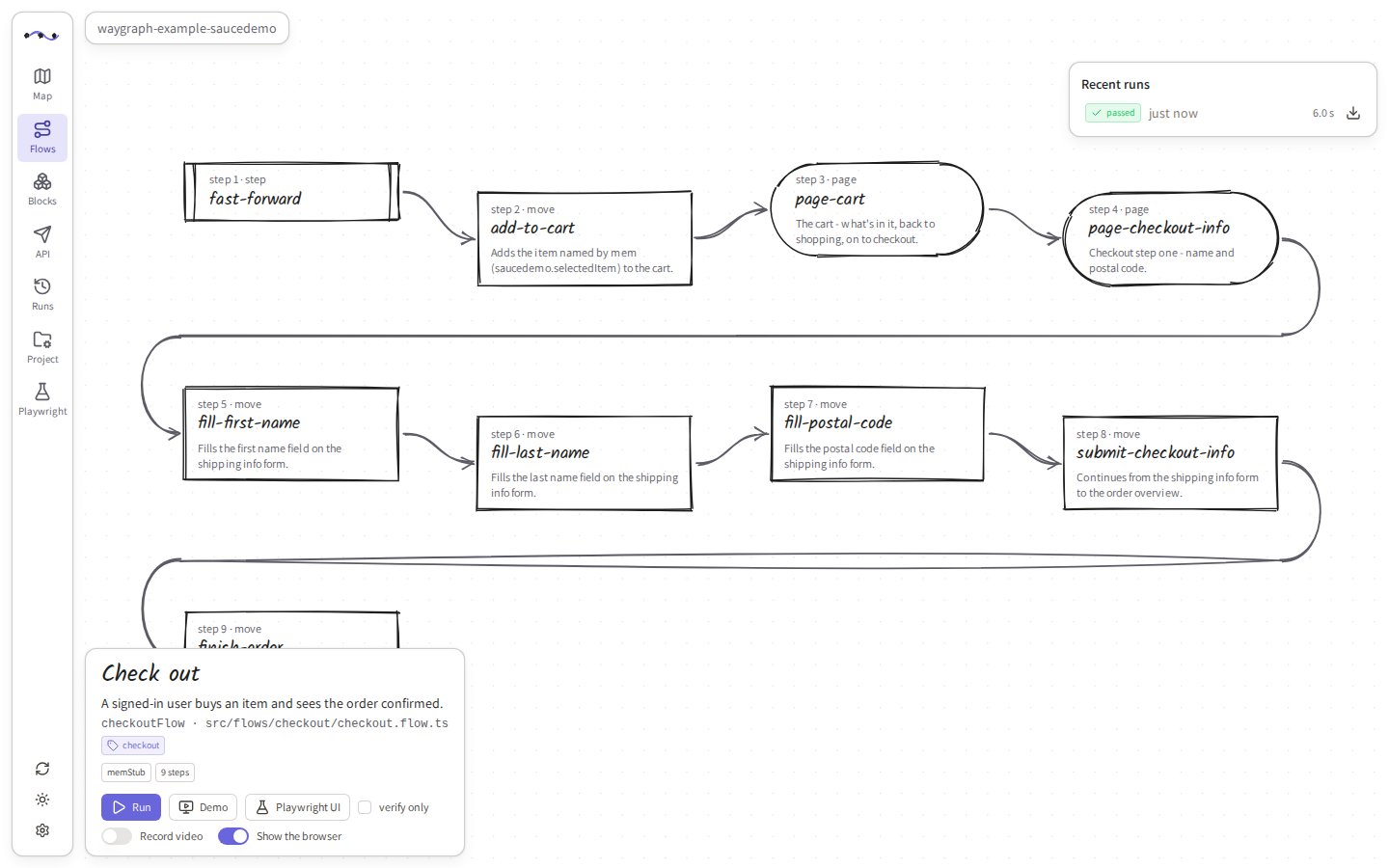
Open one for its steps on a canvas, each with what it expects, and its recent runs (a download for each video). Its shapes follow flowchart's: a step that goes to a page (a Nav or Page step) is a terminator, an API call an input / output, a fast-forward a predefined process, any other step a process.
A flow with panes, and its runs, are lanes: one per pane, each step at its place in the flow so the arrows read in order across them; a compared run (--compare) marks each step where the two sides differed.
Playing a flow
- Run plays it in the background (
waygraph run); Demo opens a browser with the step panel (waygraph demo); Playwright UI opens it as a Playwright test on the Playwright page. - verify only skips the expectations (
--no-expect). Record video and Show the browser (off: headless) say how it plays, kept in your browser. - The run's page follows it step by step; a step that fails opens as it happens. Every page shows what's playing, with Stop, which ends the flow and its browser. One flow plays at a time.
Runs
When a run is of one flow, its page shows Flow code in a panel on the right (drag it by its header, minimize it with the minus; it stays where you left it): the lines already played are tinted green or red by how the step went and the playing one is marked; the box follows the run top to bottom as it plays (untick follow the run to stay put, or pick a step to see its line).
Every run from the run log, newest first, and each run step by step: whether it passed, how long it took, the address it ended on, its screenshot when one was taken, and what the flow expected after it.
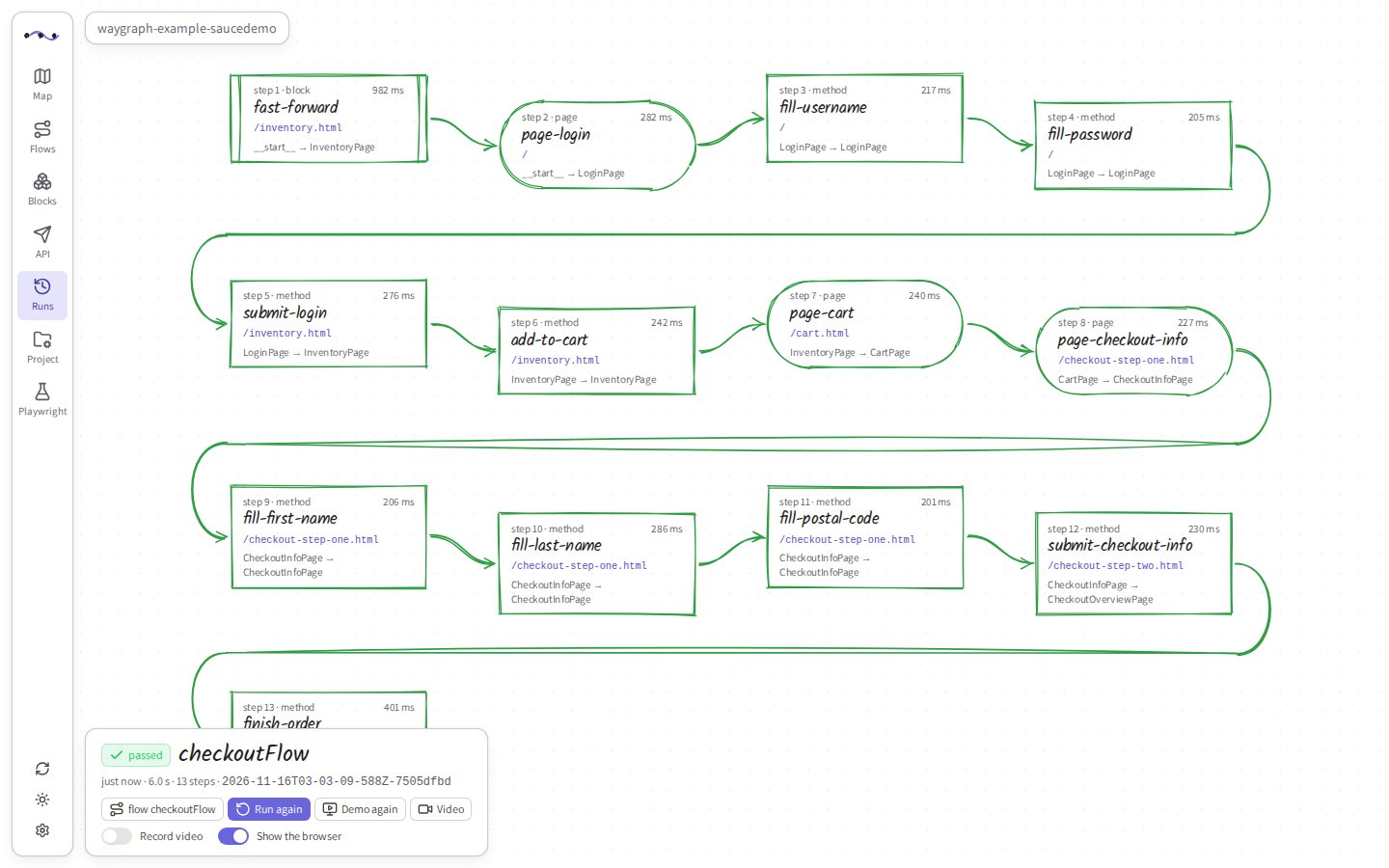
A failed step opens with what its check wanted and what it saw, and the mem the run was given:
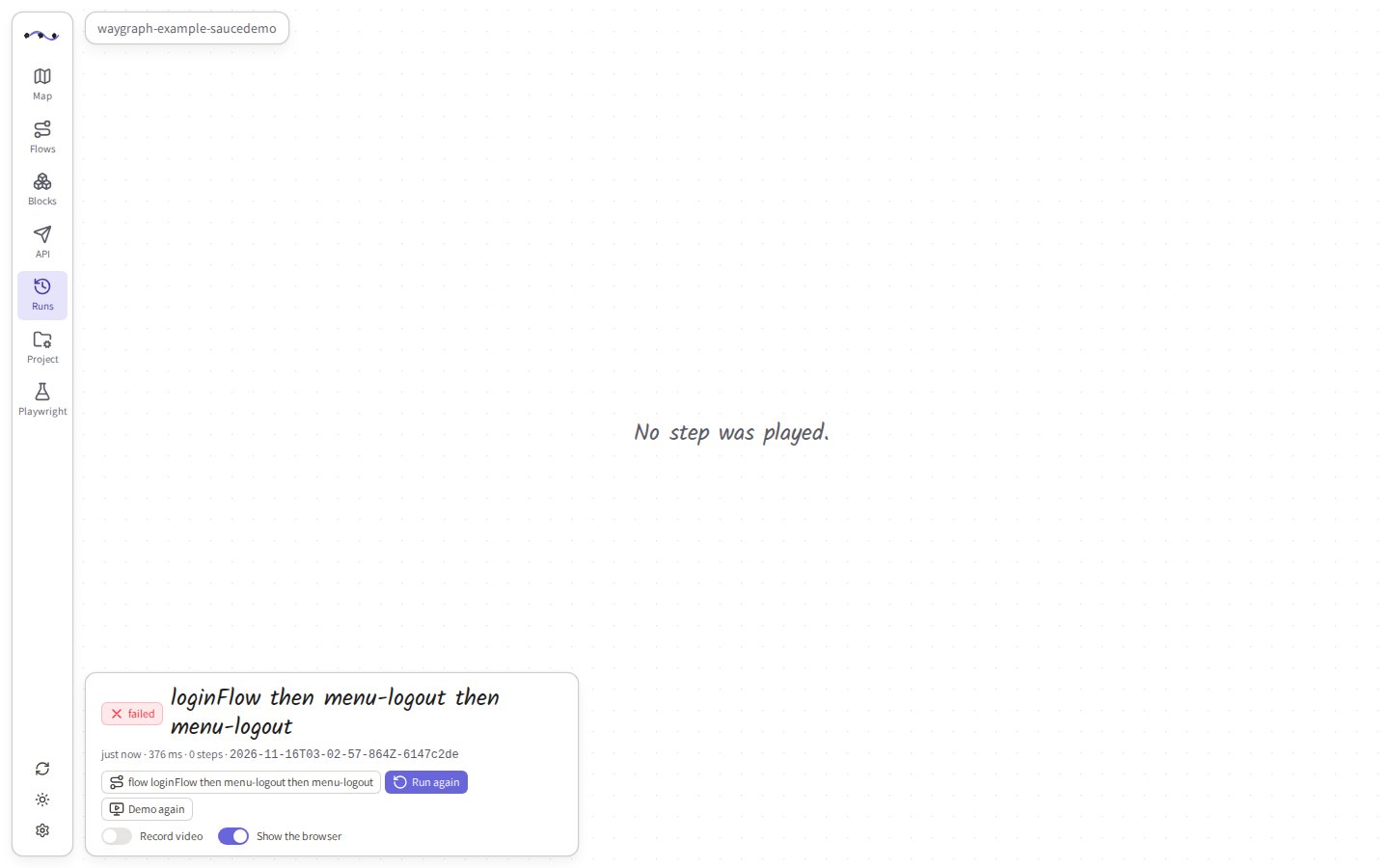
- Run again or Demo again plays a run of one flow with the mem it was seeded with (
--replay; what the run made new, a name fromunique, is made new again). - A run recorded with
--videohas Video: it plays in the page, and Download video saves it. A run with a Playwright trace has Trace to download (open it withnpx playwright show-trace). - A run with no flow named (a test calling
flow.run) counts for the flow whose steps it played.
Blocks
Every Block by the folder it lives in, with its kind, route (from → to), what it requires and how its newest runs went.
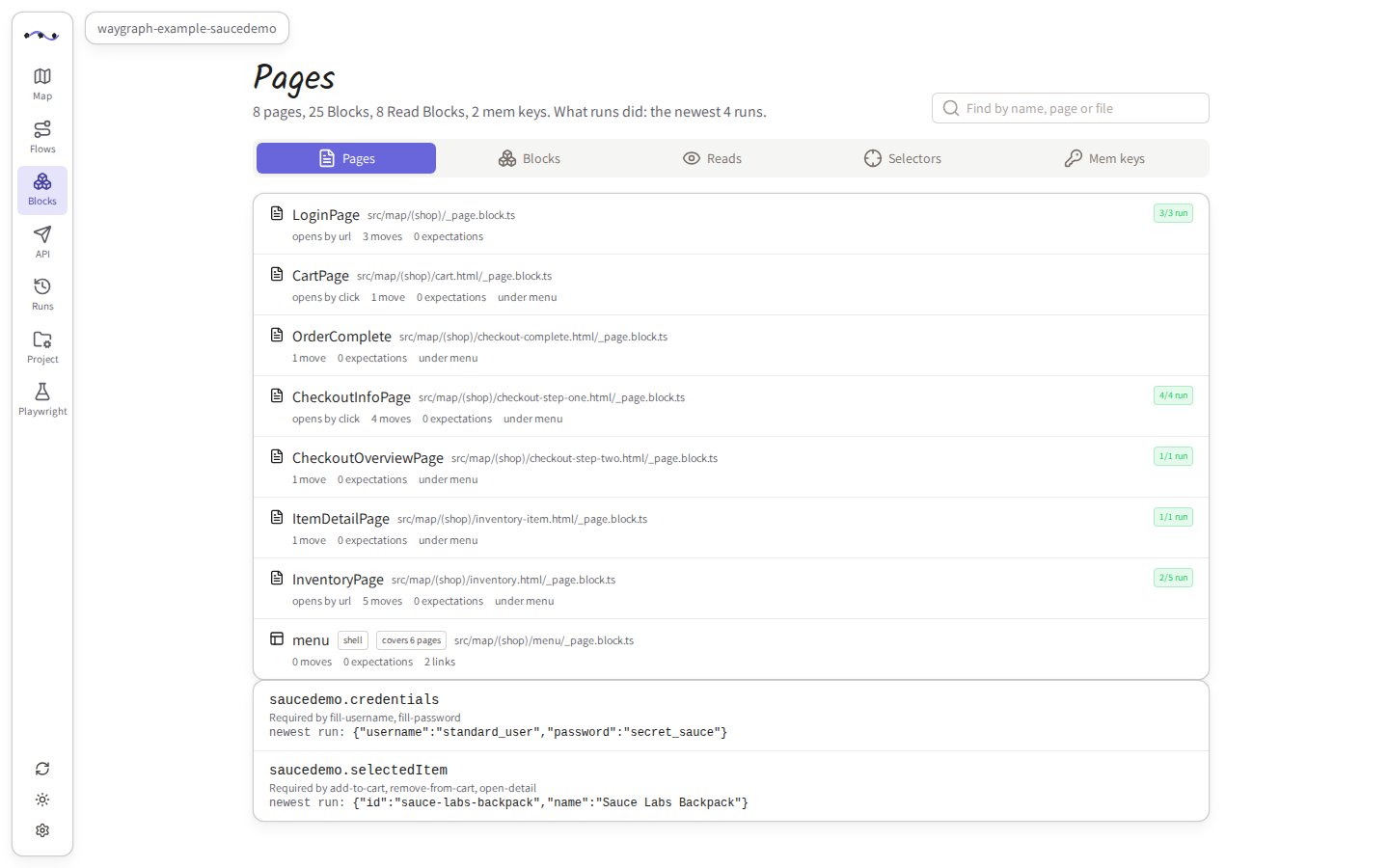
Open one for what it checks (before acting and on arrival, and what it promises wherever it's used), the selector entries it reads, its code (the lines that define it), the flows that use it, and from the newest runs how often it ran and failed, how long it takes, and what it did to the address: navigates (its step ended on another path: a submit that redirects, a click a single-page app routes) or changes the address (it stayed on its page but changed the query or hash: a tab or a filter kept in the url). The tabs beside it list the page's read (each field and its type), the selectors (every entry of the selector files, with the Blocks that read each) and the mem keys (who requires each, and the value the newest run used). Checks, selectors and code need waygraph 0.16.19 or later in the project.
API
Off in the sidebar until Settings turns it on (API under Sidebar); it still opens at /api.
The calls the newest runs made (the page's and API Blocks'), listed by route with their status. Pick one and its method, address, headers and body fill a form (credentials were masked in the run log, so those headers are left out for you to add); change anything, Send it from Studio's server, and read the answer in words (201 Created, the time, the body, the headers). Copy as cURL and Copy as API Block take it out: the second is a defineApiBlock to paste into a Block file, so a call you tried here becomes a step of a flow. Nothing to install: it is a page of Studio, not a separate tool. A flow made only of API Blocks plays in waygraph demo like any other, each step with its calls on the card.
Project
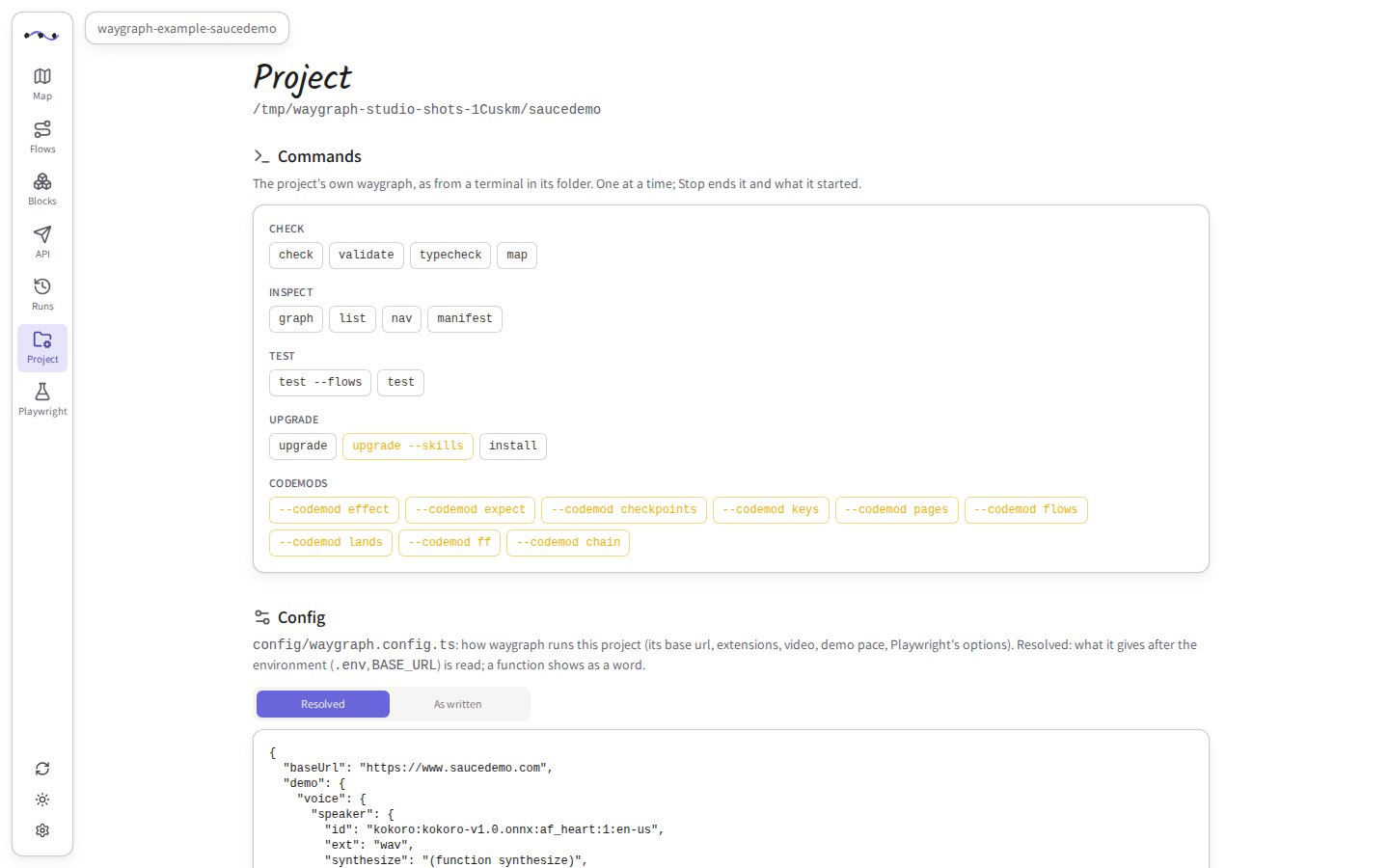
The project's waygraph commands as buttons, run with its own waygraph from its folder, one at a time, with their output: check, validate, typecheck, map, graph, list, nav, manifest, test, test --flows, upgrade, install. The ones that change files (upgrade --skills, the codemods) ask first; Stop ends one and what it started. Below, its config: what it resolves to (after .env), or the file as written.
Playwright
Playwright's UI mode over your flows (waygraph test --flows --ui), inside the app: Open Playwright UI starts it, and every flow is a test you can run, watch and step through (its trace, actions and page snapshots). Stop ends it and its browsers. On a flow, Playwright UI opens it with only that flow (Show all flows goes back to every one).
Settings
The gear at the bottom of the sidebar. Kept in your browser.
| Setting | Default | Does |
|---|---|---|
| Sidebar | every page | which pages the sidebar shows (a hidden one still opens by its address) |
| Demo: Auto-advance | on | a demo started here moves on from each step by itself (--auto-next); off, it waits for Next (--no-auto-next). The step panel's own switch still changes it while the demo plays |
Versions
What it can show depends on the waygraph in the project: the site map and page screenshots need 0.16.16 or later (on an older one the pages hang from where flows reach them), checks, selectors and code 0.16.19, the config 0.16.18, labels 0.16.20, layouts and accounts 0.16.21.
The screenshots on this page are made with npm run docs:studio-shots in the waygraph repo, from the Sauce Demo example.